What Is a Graphics Card? A Simple Guide for Desktop PC Buyers
What is a graphics card? A simple guide: how a GPU differs from a CPU, what it does in games, editing and AI, and how to tell if your desktop PC needs one.
📘 Part of The Complete Graphics Card Guide 2026. New here? Start with the guide.
Disclosure: This article contains Amazon affiliate links. If you buy through them, we may earn a small commission at no extra cost to you.
If you’ve ever wondered what is a graphics card, and why it can cost more than the rest of a PC put together, this is the place to start. No jargon, no maths: just what it is, what it does, and whether you actually need one.
Already know the basics? Our shorter posts on Integrated Graphics and Dedicated GPUs (with a laptop focus) cover the essentials. This article is written for people buying or upgrading a desktop PC.
What is a graphics card, in one sentence?
A graphics card is a separate board inside your computer, built around a chip called a GPU (graphics processing unit), that does the enormous number of small calculations needed to draw images, play video and run AI, much faster than your main processor can.
You’ll hear “graphics card” and “GPU” used interchangeably. Strictly, the GPU is the chip, and the graphics card is the whole board: the chip plus its own memory, cooling fans, power connectors and display sockets.
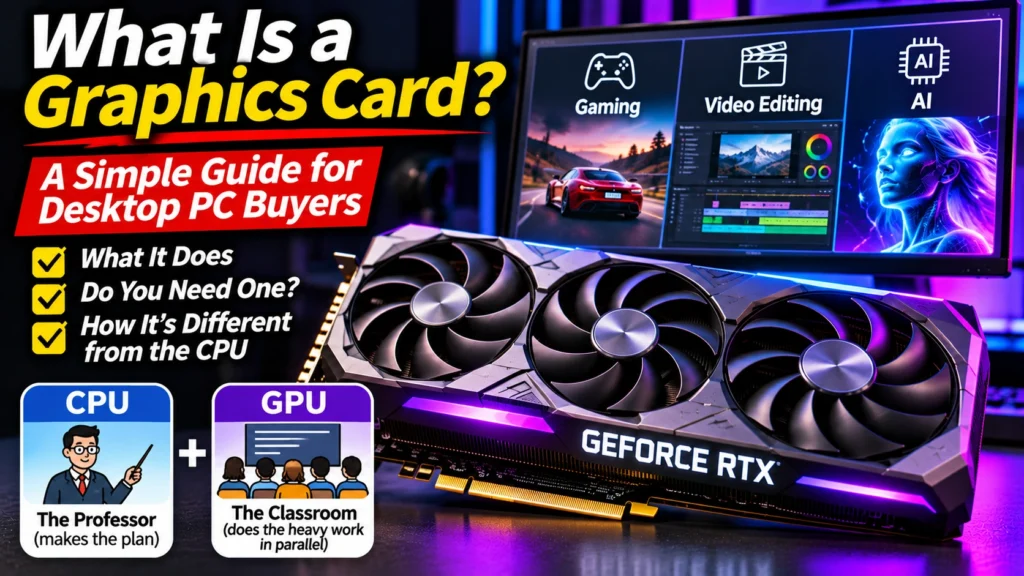
The professor and the classroom
The easiest way to understand a graphics card is to compare it with the main processor.
Your processor (CPU) is like a brilliant professor. It can solve almost any problem, including complicated ones that need careful, step-by-step thinking. But it only has a handful of hands. A typical desktop processor has somewhere between 6 and 24 cores; the popular Intel Core i5-13600K, for example, has 14.
Your graphics processor (GPU) is like a huge classroom of students. Each student can only do simple sums, but there are thousands of them, and they all work at the same time. NVIDIA’s RTX 5070 has 6,144 of these small cores, called CUDA cores (NVIDIA).
Give the professor a tricky puzzle, and they’ll beat the classroom. Give them a million simple sums to do at once, and the classroom wins by miles. That’s the whole idea behind a graphics card.
Why pictures, video and AI need “many small sums at once”
A 1080p screen is made of about 2 million dots (pixels). To show a game, the computer must work out the colour of every one of those dots, then do it all again 60 to 240 times every second. Each dot is a fairly simple calculation, but there are millions of them, every fraction of a second. That’s perfect work for the classroom.
The same pattern shows up elsewhere:
- Video editing: every frame of video is millions of pixels to decode, colour-correct and apply effects to.
- AI: chatbots and image generators run on billions of simple multiplications, done in parallel.
- Streaming: your webcam’s background removal works on every pixel of every frame, live.
So “graphics card” is a bit of an old-fashioned name. Today’s GPUs are general-purpose parallel calculators that happen to be brilliant at graphics.
👉 The different kinds of “students” inside a GPU (CUDA, Tensor and RT cores): Article 15: CUDA, Tensor and RT Cores Explained
How a graphics card draws a frame (the simple version)
When you play a game, this happens every single frame:
- The processor works out what’s happening: where the characters are, what the physics is doing, where the camera points. It sends instructions to the graphics card.
- The graphics card builds the 3D scene from shapes, wraps them in textures (the “skins” on every surface), works out the lighting and shadows, and colours in every pixel.
- The finished picture goes out through a cable to your monitor.
The graphics card keeps the textures and the picture it’s building in its own fast memory, called VRAM. That’s what the “8GB” or “12GB” on the box refers to.
👉 How much VRAM you need: Article 3: How Much VRAM Do You Need?
What is a graphics card compared with integrated graphics?
Most processors have a small, basic GPU built into the chip itself, called integrated graphics. It shares your PC’s normal RAM instead of having its own, and it’s far less powerful than a separate card, but it’s free and uses very little power.
| Integrated graphics | Dedicated graphics card | |
|---|---|---|
| Where it is | Built into the processor | A separate board in a long slot |
| Memory | Borrows your PC’s RAM | Its own fast VRAM (8–32 GB) |
| Good for | Office work, web, YouTube, 4K video playback, light older games | Modern games, video editing, AI, streaming with effects |
| Power use | Very low | Roughly 130 W to 575 W |
| Cost | Included | Tens of thousands of rupees and up |
One thing to watch: some processors have no integrated graphics at all. Intel desktop chips with an “F” at the end of the name (like the Core i5-12400F) need a separate graphics card just to show a picture.
Do you actually need a graphics card?
You probably don’t need one if you mainly: – browse the web, use email, Word and Excel – watch YouTube, Netflix and other videos, even in 4K – attend video calls – play light, older or casual games
Modern integrated graphics handle all of that comfortably, as our Integrated Graphics Explained post covers.
You do need one if you want to: – play modern games at good settings and frame rates – edit video smoothly, especially 4K, with colour grading and effects – run AI chatbots or image generators on your own PC – stream with webcam effects like background blur or removal – do 3D design, animation or rendering – use more than two or three monitors, or high-refresh gaming monitors
Signs your current graphics card isn’t enough
If you already have a card, these are signs it’s time to upgrade (or to check your settings):
- Games stutter or you have to drop to low settings to get a smooth frame rate
- Video timelines lag during playback, or exports take far longer than they should
- AI tools refuse to load a model, or run painfully slowly
- Your stream lags when you turn on camera effects
- The card runs very hot and loud all the time
Before buying, check what’s actually happening. Open Task Manager (Ctrl + Shift + Esc) → Performance → GPU. If the GPU is near 100% while you work, it’s the bottleneck. If “Dedicated GPU memory” is near full, you need more VRAM. A real example of this check is in Article 8: Best GPU for Streaming.
How to find out what graphics card you have
- Press Ctrl + Shift + Esc to open Task Manager.
- Click Performance, then GPU in the left column (you may see GPU 0 and GPU 1 if you have both integrated graphics and a card).
- The name appears at the top right, for example “NVIDIA GeForce RTX 2060 SUPER”.
You can also right-click the Start button → Device Manager → Display adapters.
Who makes graphics cards?
Three companies design the GPU chips:
- NVIDIA: GeForce RTX cards. The most popular, especially for streaming, editing and AI.
- AMD: Radeon RX cards. Often the best value for pure gaming.
- Intel: Arc cards. Budget options, though stock is limited in India.
Then brands like ASUS, MSI, Zotac, Gigabyte, Sapphire and others build the actual cards around those chips, which is why you’ll see many versions of the same card on Amazon.
👉 How to read GPU names and brands: Article 11: How to Read GPU Names
Quick summary
- A graphics card is a separate board with a GPU chip, its own memory and cooling, built to do millions of simple calculations at once.
- CPU = a brilliant professor; GPU = a huge classroom. The classroom wins at graphics, video and AI.
- Integrated graphics are fine for office work, web and video; a dedicated card is needed for modern games, editing, AI and streaming with effects.
- Check Task Manager to see your card’s name, how busy it is and how much memory it’s using.
- Intel “F” processors have no built-in graphics and always need a card.
What to look for on Amazon: checklist
- ☐ You’ve confirmed you need a card for your work (games, editing, AI, streaming)
- ☐ You know your current card (or that you have only integrated graphics)
- ☐ You’ve chosen a card for what you do: see Articles 5 (editing), 6 (AI), 7 (gaming) or 8 (streaming)
- ☐ Your power supply can run it (Article 4: Power Supply for Your Graphics Card)
- ☐ It fits your cabinet
Where to start shopping
If you’re buying your first graphics card, these are sensible starting points (check today’s price and see Article 2: GPU Buying Guide India 2026 for price bands):
- Gaming on a budget: AMD RX 9060 XT 16 GB
- All-rounder for editing and streaming: NVIDIA RTX 5070
- AI on a budget: NVIDIA RTX 5060 Ti 16 GB
Bottom Line
So, what is a graphics card? It’s your PC’s specialist for doing millions of simple calculations at once, which is exactly what games, video editing, AI and streaming effects need. If you only browse, work in Office and watch videos, your processor’s built-in graphics are enough. If you game, edit, run AI or stream with effects, a dedicated card is the single biggest upgrade you can make, and the rest of this series will help you pick the right one.
Sources
- NVIDIA: GeForce RTX 5070 family specifications
- Top Tech Compare: Integrated Graphics Explained
- Top Tech Compare: Dedicated GPU Explained
- AMD Radeon graphics cards (official)
- Intel Arc graphics (official)
Where next?
⬅️ Back to The Complete Graphics Card Guide 2026: see all 20 articles
➡️ Next: Article 10: Parts of a Graphics Card Explained
🔗 Related: – Article 1: Decoding an Amazon GPU Listing – Article 3: How Much VRAM Do You Need? – Article 11: How to Read GPU Names