Wi-Fi 7 Explained: What Actually Changes Over Wi-Fi 6
What Wi-Fi 7 improves over Wi-Fi 6 and 6E, what Multi-Link Operation actually does, and whether upgrading your router and devices is worth it yet.
Wi-Fi 7, formally known as IEEE 802.11be, is the newest generation of Wi-Fi wireless networking standard, offering meaningfully higher maximum theoretical speeds, reduced latency, and improved performance in congested environments with many connected devices compared with the previous Wi-Fi 6 and Wi-Fi 6E generations, though most home users won’t fully saturate its maximum capabilities with typical everyday internet use.
Multi-Link Operation: Wi-Fi 7's Signature Feature
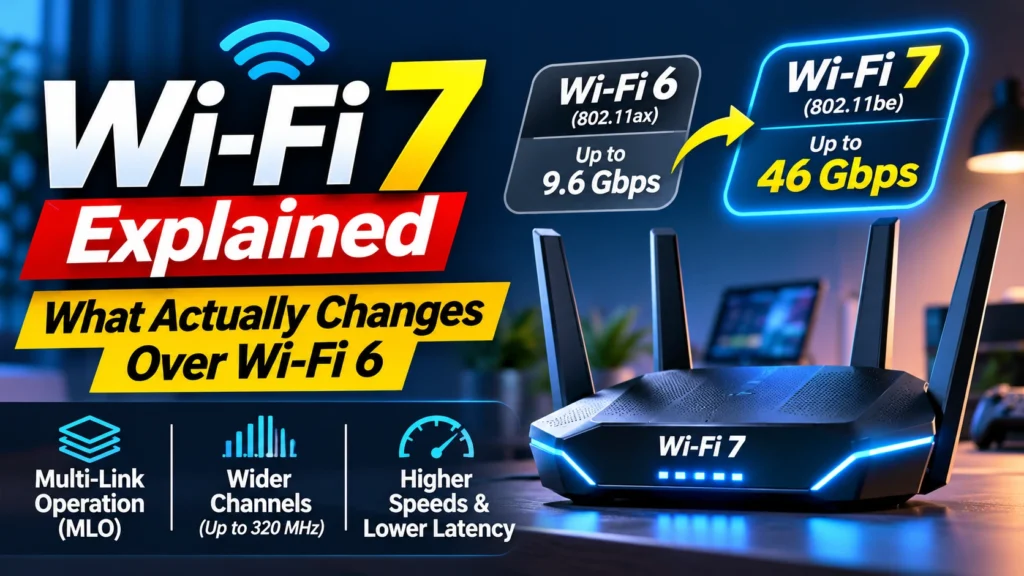
Wi-Fi 7’s most significant technical addition is Multi-Link Operation, which allows a single device to simultaneously transmit and receive data across multiple different Wi-Fi frequency bands at once, rather than being limited to one band at a time as with previous Wi-Fi generations, a genuinely new capability that improves both connection reliability and reduces latency by allowing data to route around interference or congestion on any single band dynamically.
Wider Channels and Higher Theoretical Speeds
Wi-Fi 7 supports considerably wider wireless channels than previous generations, along with a higher-order modulation scheme that packs more data into each wireless transmission, together delivering substantially higher maximum theoretical data speeds than Wi-Fi 6E, though achieving those peak theoretical speeds in practice requires both a Wi-Fi 7 router and a Wi-Fi 7-compatible device positioned close together with minimal interference, conditions not always met in typical everyday home network usage.
Why Most Home Users Won't Notice a Dramatic Everyday Difference Yet
For typical everyday internet use, web browsing, video streaming, and video calls, most current internet service provider connection speeds remain well below what even Wi-Fi 6 can already deliver, meaning Wi-Fi 7’s higher maximum theoretical speed ceiling matters considerably less for typical single-user browsing than it does for specific demanding use cases like transferring very large files between devices on a local network, competitive online gaming sensitive to latency, or households with many simultaneously connected devices competing for bandwidth.
Backward Compatibility With Older Wi-Fi Devices
Wi-Fi 7 routers maintain backward compatibility with older Wi-Fi 6, Wi-Fi 5, and earlier generation devices, meaning upgrading to a Wi-Fi 7 router doesn’t require replacing every connected device immediately, though older devices will only connect at their own maximum supported Wi-Fi generation speed rather than benefiting from Wi-Fi 7’s specific improvements, which only become available once both the router and the connecting device support the Wi-Fi 7 standard.
When Upgrading to Wi-Fi 7 Makes the Most Sense
Wi-Fi 7 upgrades deliver the clearest practical benefit for households with many simultaneously connected smart home devices, competitive gamers prioritizing the lowest possible latency, and anyone regularly transferring very large files across their local home network, while households with more modest internet speeds and typical everyday browsing and streaming needs may see comparatively little practical difference from upgrading immediately versus waiting for Wi-Fi 7 device support to become more widespread and pricing to come down further.
Bottom Line
Wi-Fi 7 improves on Wi-Fi 6 and 6E primarily through Multi-Link Operation’s simultaneous multi-band connectivity, wider channels, and higher theoretical maximum speeds, benefits that matter most for demanding use cases like large file transfers, competitive gaming, and heavily congested multi-device households. Most typical everyday browsing and streaming use cases won’t fully exploit Wi-Fi 7’s maximum capabilities yet, making the upgrade most worthwhile for specific higher-demand situations rather than a universal must-have upgrade.
Sources
- IEEE 802.11be (Wi-Fi 7) technical standard documentation
- Independent Wi-Fi 7 router performance testing from major tech outlets
- Wi-Fi Alliance official Wi-Fi 7 feature and Multi-Link Operation documentation
- Comparative Wi-Fi 7 versus Wi-Fi 6E real-world speed and latency testing