CUDA Cores, Tensor Cores and RT Cores Explained: The Workers Inside Your Graphics Card
CUDA cores, Tensor cores and RT cores explained simply: what each does, plus NVENC and NVDEC, and what they mean for gaming, editing, AI and streaming.
📘 Part of The Complete Graphics Card Guide 2026. New here? Start with the guide.
Disclosure: This article contains Amazon affiliate links. If you buy through them, we may earn a small commission at no extra cost to you.
NVIDIA’s spec sheets are full of “cores”: CUDA cores, Tensor cores, RT cores. AMD talks about compute units and AI accelerators. What are all these, and which ones matter for what you do? This guide explains the different “workers” inside a graphics card in plain language, starting with CUDA cores, and tells you which ones count for gaming, video editing, AI and streaming.
Our shorter GPU Core Count Explained post covers why you can’t compare core counts across brands. This article goes further: what each type of core actually does.
CUDA cores and the other specialist teams in a GPU
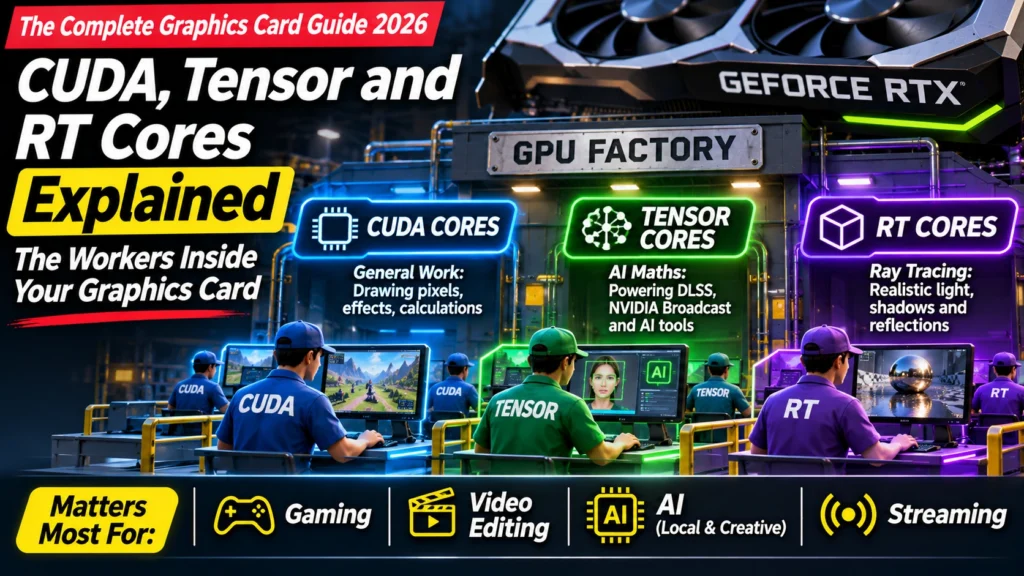
Think of a graphics chip as a factory. Most of the floor is filled with general workers who can do almost any simple job. But there are also specialist teams: one that handles lighting, one that handles AI maths, and dedicated machines at the loading bay for packing and unpacking video.
On an NVIDIA chip, those teams are:
| Worker | Job | Matters most for |
|---|---|---|
| CUDA cores | General work: drawing every pixel, effects, calculations | Everything |
| Tensor cores | AI maths | DLSS, NVIDIA Broadcast, local AI, AI editing tools |
| RT cores | Ray tracing (realistic light, shadows and reflections) | Games with ray tracing, 3D rendering |
| NVENC | Video encoding (compressing video) | Streaming, exporting videos |
| NVDEC | Video decoding (unpacking video) | Video editing playback, watching video |
Let’s meet each team.
CUDA cores: the general workforce
CUDA cores are NVIDIA’s general-purpose workers. They do most of the work in a game (working out the colour of every pixel), run many effects in editing apps, and handle the bulk of number-crunching in other software. “CUDA” is also the name of NVIDIA’s software platform that lets programs use these cores, which is a big reason so many AI and creative tools are built for NVIDIA first.
Generally, more CUDA cores means more performance within the same generation:
| Card | CUDA cores |
|---|---|
| RTX 5090 | 21,760 |
| RTX 5080 | 10,752 |
| RTX 5070 Ti | 8,960 |
| RTX 5070 | 6,144 |
| RTX 5060 Ti | 4,608 |
| RTX 5060 | 3,840 |
| RTX 5050 | 2,560 |
Source: NVIDIA
Two warnings: – Don’t compare across generations or brands. An RTX 50 series core and an RTX 30 series core aren’t equal, and NVIDIA’s CUDA cores can’t be compared with AMD’s stream processors. – Cores aren’t everything. Clock speed, memory bandwidth and the other core types all affect real performance. Benchmarks are the final word.
👉 Clock speed: Article 14: GPU Clock Speed and OC Edition · Memory bandwidth: Article 13: Memory Bus Width Explained
Tensor cores: the AI specialists
Tensor cores are built for one kind of maths: the huge grids of multiplications that AI models run on. They do this many times faster than general CUDA cores. NVIDIA’s RTX 50 series uses its 5th generation of Tensor cores.
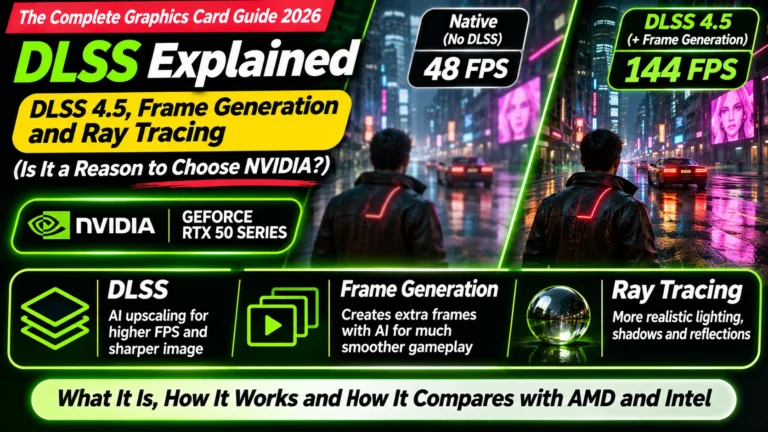
What they power: – DLSS: AI that makes games run faster while looking sharp (see Article 20: DLSS Explained) – NVIDIA Broadcast: webcam background removal and microphone noise removal – Local AI: chatbots and image generators running on your own PC – AI features in editing apps: auto-captions, AI noise reduction, upscaling, masking
NVIDIA rates Tensor core power in “AI TOPS” (trillions of AI operations per second). The RTX 5090, for example, is listed at 3,352 AI TOPS (NVIDIA). Higher means faster AI work.
Real example: a streaming PC with a 2019-era RTX 2060 SUPER (2nd generation Tensor cores) ran NVIDIA Broadcast’s background removal at about 90% of the whole card’s capacity, while using under 2 GB of its memory. The old AI cores were simply overwhelmed. Newer generations do the same job with far more headroom. The full story is in Article 8: Best GPU for Streaming.
👉 AI on your PC: Article 6: Best GPU for AI
RT cores: the lighting specialists
RT cores (ray-tracing cores) calculate how light bounces around a scene: realistic reflections in puddles, accurate shadows, light glowing through windows. This is called ray tracing, and it’s extremely demanding. RT cores make it fast enough for games. The RTX 50 series uses 4th generation RT cores.
RT cores matter if you: – play games with ray tracing switched on (Cyberpunk 2077, newer AAA games) – do 3D rendering in tools like Blender, where they speed up final renders
If you always switch ray tracing off, RT cores matter less to you. This is one reason AMD cards are good value for gamers who don’t use ray tracing heavily, while NVIDIA leads when ray tracing is on (see Article 7: Best Graphics Card for Gaming).
NVENC and NVDEC: the video machines
These aren’t “cores” in the same sense; they’re dedicated video engines that sit beside the cores.
- NVENC (NVIDIA Encoder) compresses video: for streaming on Kick or YouTube, and for exporting videos. Because it’s separate hardware, it barely slows down your game while you stream.
- NVDEC (NVIDIA Decoder) unpacks compressed video: for smooth playback of camera footage in your editing timeline, and for watching videos.
The RTX 50 series uses 9th generation NVENC and 6th generation NVDEC, which added support for 4:2:2 camera footage, a big deal for video editors. Higher-end cards also have more of these engines:
| Card | NVENC encoders | NVDEC decoders |
|---|---|---|
| RTX 5090 | 3 | 2 |
| RTX 5080 | 2 | 2 |
| RTX 5070 Ti | 2 | 1 |
| RTX 5070, 5060 Ti, 5060, 5050 | 1 | 1 |
Source: NVIDIA
More encoders speed up exports in apps that can split work between them, and more decoders help with multicam editing. For single-camera YouTube editing and streaming, one of each is plenty.
👉 Editing: Article 5: Best Graphics Card for Video Editing · Streaming: Article 8: Best GPU for Streaming
What about AMD and Intel?
They have the same kinds of workers, with different names:
| NVIDIA | AMD (Radeon RX 9000) | Intel (Arc) |
|---|---|---|
| CUDA cores | Stream processors, grouped in compute units | Xe cores (vector engines) |
| Tensor cores | AI accelerators | XMX engines |
| RT cores | Ray accelerators | Ray tracing units |
| NVENC / NVDEC | Video Codec Engine | Media engine |
For example, AMD’s RX 9070 XT has 64 compute units with 4,096 stream processors, 64 ray accelerators and 128 AI accelerators; the RX 9060 XT has exactly half of each (Scan, PCGamesN).
AMD’s RX 9000 series made big gains in ray tracing and AI over its previous generation. But NVIDIA still leads in software support for AI and creative tools, largely thanks to CUDA, and only NVIDIA cards run NVIDIA Broadcast and DLSS.
Which cores matter for you?
| You mainly… | Cores that matter most | Advice |
|---|---|---|
| Play games (no ray tracing) | CUDA / stream processors | AMD is strong value |
| Play games with ray tracing | RT cores, Tensor cores (DLSS) | NVIDIA leads |
| Edit video | NVDEC, NVENC, CUDA, Tensor (AI tools) | NVIDIA RTX 50 for 4:2:2 footage |
| Run AI | Tensor cores (and VRAM above all) | NVIDIA; 16 GB+ |
| Stream with webcam effects | NVENC, Tensor cores | NVIDIA RTX, the newer the better |
| 3D rendering | RT cores, CUDA | NVIDIA |
Quick summary
- CUDA cores are general workers; more cores means more speed within the same generation.
- Tensor cores do AI: DLSS, NVIDIA Broadcast, local AI and AI editing tools.
- RT cores handle ray tracing in games and 3D rendering.
- NVENC and NVDEC are video engines for streaming, exporting and editing playback; higher-end cards have more of them.
- AMD and Intel have equivalents with different names; NVIDIA leads in AI and creator software support.
- Never compare core counts across brands or generations; use benchmarks.
What to look for on Amazon: checklist
- ☐ You’re comparing core counts only within the same brand and generation
- ☐ For AI, DLSS or NVIDIA Broadcast, the card is an NVIDIA RTX (newer generation = faster Tensor cores)
- ☐ For ray tracing, you’ve checked ray-traced benchmarks, not just core counts
- ☐ For multicam editing, you’ve checked the number of NVDEC decoders
- ☐ For streaming to YouTube, it’s an RTX 40 or 50 card (AV1 encoding)
Shop by use
- Streaming and editing: NVIDIA RTX 5070
- AI on a budget: NVIDIA RTX 5060 Ti 16 GB
- Gaming value: AMD RX 9070
- Ray tracing and heavy creative work: NVIDIA RTX 5070 Ti
Bottom Line
CUDA cores are a graphics card’s general workforce, but they’re only one of several teams. Tensor cores drive AI features like DLSS and NVIDIA Broadcast, RT cores handle ray tracing, and NVENC/NVDEC speed up streaming and editing. Match the cores to your work: AMD’s strong general performance suits pure gamers, while NVIDIA’s Tensor cores, video engines and CUDA software support make it the better choice for AI, editing and streaming.
Sources
- NVIDIA: GeForce graphics card comparison (RTX 50 series)
- NVIDIA: GeForce RTX 5070 family specifications
- AMD: Radeon RX 9070 XT specifications
- Scan: AMD RX 9000 series specifications
- PCGamesN: Radeon RX 9060 XT guide
- Top Tech Compare: GPU Core Count Explained
Where next?
⬅️ Back to The Complete Graphics Card Guide 2026: see all 20 articles
➡️ Next: Article 16: Two Fans or Three? GPU Cooling and Card Size
🔗 Related: – Article 6: Best GPU for AI – Article 8: Best GPU for Streaming – GPU Core Count Explained