Two Fans or Three? GPU Cooling, Card Size and Slots Explained (and Will It Fit?)
GPU cooling explained: two fans vs three, what 2.5-slot and SFF-Ready mean, real temperature and noise results, and how to measure your cabinet before you buy.
📘 Part of The Complete Graphics Card Guide 2026. New here? Start with the guide.
Disclosure: This article contains Amazon affiliate links. If you buy through them, we may earn a small commission at no extra cost to you.
Look at the RTX 5070 on Amazon and you’ll find compact two-fan cards about 23 cm long and huge three-fan cards nearly 34 cm long, all with the same chip. Which should you buy? GPU cooling affects how hot, how loud and how fast your card runs, and the card’s size decides whether it fits in your PC at all. This guide explains both, with real test results.
Why graphics cards get hot
A graphics card turns electricity into heat. An RTX 5070 can draw around 250 W while gaming, and almost all of that ends up as heat that has to go somewhere. (For comparison, that’s like having two or three old-style incandescent bulbs inside your cabinet.)
If the heat isn’t removed fast enough, the chip protects itself by slowing down. This is called thermal throttling (our Thermal Throttling Explained post covers it in detail). So a better cooler doesn’t just mean a cooler card. It means the card holds its top speed for longer, and does it more quietly.
In India this matters more than in many countries. If your room is 35 °C in May without air conditioning, the air your cooler pushes through is already hot, and every degree of cooling headroom helps.
How GPU cooling works
A cooler moves heat from the chip into the air, in a few steps:
- Thermal paste and pads carry heat from the chip, memory and power parts into the cooler.
- A copper base or vapor chamber (a sealed flat chamber with a little liquid inside) spreads the heat out.
- Heatpipes (copper tubes) carry the heat to a heatsink: a block of thin metal fins, like a car radiator.
- Fans blow air through the fins, carrying the heat away.
The bigger the heatsink, the more heatpipes, and the more airflow, the better the cooling. Our Laptop Cooling Systems Explained post covers heatpipes and vapor chambers in more depth, and Article 10: Parts of a Graphics Card Explained explains every part of the card.
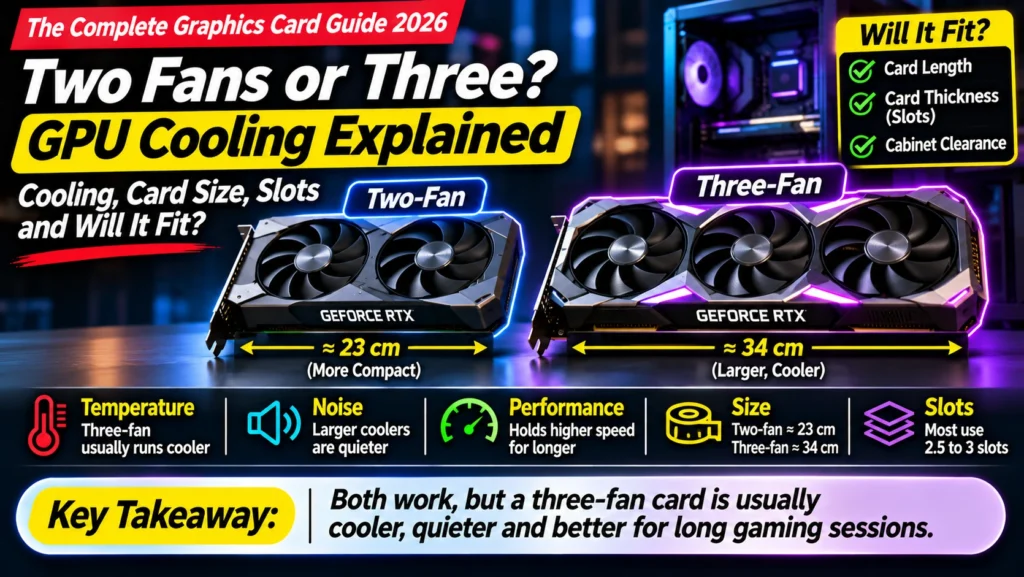
GPU cooling with two fans vs three fans
| Two-fan cards | Three-fan cards | |
|---|---|---|
| Heatsink size | Smaller | Larger |
| Temperature | Usually higher | Usually lower |
| Noise under load | Usually louder (fans spin faster) | Usually quieter |
| Length | Short (about 23–30 cm) | Long (about 30–34 cm) |
| Weight | Lighter | Heavier (may sag) |
| Price | Usually cheaper | Usually more expensive |
| Best for | Small cabinets, tight budgets | Larger cabinets, hot rooms, quiet PCs |
The number of fans is really a clue about heatsink size. Three fans need a long heatsink, and a bigger heatsink is what actually cools better. Fewer, bigger fans can also be quieter than more, smaller ones, so judge the whole cooler, not just the fan count.
What the tests show
Independent reviews show how big the difference can be on the same chip:
- ASUS TUF RTX 5070 (three fans, large cooler): TechPowerUp measured 61 °C at 26.2 dBA, or 67 °C at an almost silent 22.8 dBA on its quiet setting. It was the strongest cooler of the five RTX 5070 cards TechPowerUp tested, running more than 21 °C cooler than NVIDIA’s own Founders Edition (our comparison, citing TechPowerUp).
- MSI RTX 5070 Ti Ventus 3X OC vs Ventus 3X PZ: two similar-looking three-fan cards differed by 7.5 dBA (40.9 vs 33.4 dBA), a clearly audible gap.
What is dBA? It’s a measure of loudness. Around 25 dBA is close to silent inside a closed cabinet; around 40 dBA is clearly audible, like a quiet library getting busier. Every 10 dBA sounds roughly twice as loud.
I couldn’t find independent noise tests for the smallest two-fan RTX 5070 cards, but a small cooler on a 250 W chip has to spin its fans faster, so expect them to be louder under load.
What “slots” and “2.5-slot” mean
On the back of your PC cabinet are metal covers called expansion slots, each about 2 cm apart. A graphics card’s thickness is measured in how many of these slots it covers:
- 2-slot: about 4 cm thick, the slimmest
- 2.5-slot: about 5 cm thick, common on mid-range cards
- 3-slot and above: 6 cm or more, common on premium cards with big coolers
Thicker cards have room for bigger heatsinks, but they can block motherboard slots below them (for example, a Wi-Fi card or capture card) and need more space.
What “SFF-Ready” means
SFF stands for small form factor: compact PC cabinets. NVIDIA’s SFF-Ready label is for cards small enough to fit them. To qualify, a card must be no more than 304 mm long, 151 mm tall (including the power cable bend) and 2.5 slots (50 mm) thick, and it applies to RTX 70-class cards and above (NVIDIA).
If your cabinet is compact, SFF-Ready cards (like the ASUS Prime RTX 5070) are the safe choice.
RTX 5070 sizes: a real example
Here’s how much RTX 5070 cards vary:
| Card | Length | Thickness | Fans |
|---|---|---|---|
| MSI Shadow 2X | ~231 mm | ~2.5 slots | 2 |
| MSI Ventus 2X OC | 236 mm | 2.5 slots | 2 |
| Zotac Twin Edge OC | 241.5 mm | 2 slots | 2 |
| ASUS Prime OC | 304 mm | 2.5 slots (SFF-Ready) | 3 |
| Gigabyte Gaming OC | 327 mm | ~3 slots | 3 |
| ASUS TUF OC | 330 mm | 3 slots | 3 |
| MSI Gaming Trio OC | 338 mm | ~2.7 slots | 3 |
Sources: NVIDIA SFF list, Zotac, TechPowerUp, HotHardware, our comparison
That’s a 10 cm difference in length for the same chip. Higher-end cards go further: Gigabyte’s RTX 5070 Ti Gaming OC is 342 mm long and a full 4 slots thick.
Will it fit? How to measure your cabinet
Do this before you buy, especially if the listing is marked non-returnable.
- Find your cabinet’s official “GPU clearance”. Search your cabinet’s model name plus “specifications” on the maker’s website. It’s usually listed as “max GPU length” in mm.
- Or measure it yourself. Open the side panel. Measure from the inside of the back panel (where the card’s ports go) to the nearest obstacle at the front: the front fans, a radiator, or drive cages.
- Subtract for front fans or a radiator if they sit in the way and aren’t already counted in the official figure.
- Check the height. Measure from the slot to the side panel glass, and leave room for the power cable to bend; NVIDIA’s own guideline allows 151 mm including the cable.
- Check the thickness. Count how many expansion slot covers are free below the top slot.
- Compare with the card’s dimensions on the brand’s website (not just the Amazon listing), and leave at least 1 cm to spare.
Other GPU cooling features to know
- Zero RPM / fan stop: the fans switch off completely when the card is idle, so it’s silent while you browse or type. Most modern cards have it.
- Dual BIOS: some premium cards have a small switch for a quiet or performance mode. The ASUS TUF’s quiet mode is the 22.8 dBA result above.
- Backplate: a metal back panel that stiffens the card and can help spread heat.
- Support bracket: heavy three-fan cards can sag over time and strain the slot. Use the bracket or stand that often comes in the box.
Free ways to cool any card better
- Good cabinet airflow: fans at the front pulling cool air in, and at the back or top pushing hot air out.
- Keep it clean: dust on fans and fins is a big cause of rising temperatures, especially in Indian homes. Clean every few months with a soft brush or air blower (with the PC off and unplugged).
- Tidy cables so they don’t block airflow.
- Leave space around the cabinet; don’t push it into a tight corner or cupboard.
- Use the quiet BIOS if your card has one and you value silence over the last few percent of speed.
Quick summary
- Better cooling means a cooler, quieter and slightly faster card, especially in hot rooms.
- Three fans usually means a bigger heatsink, so lower temperatures and less noise, but a longer, heavier card.
- Real tests show big differences: one three-fan RTX 5070 ran 21 °C cooler than NVIDIA’s own version.
- “Slots” measure thickness (about 2 cm each); SFF-Ready cards fit compact cabinets (≤304 mm long, ≤2.5 slots).
- RTX 5070 cards range from about 23 cm to 34 cm long. Measure your cabinet first.
- Use the support bracket on heavy cards, and clean the dust regularly.
What to look for on Amazon: checklist
- ☐ You know your cabinet’s maximum GPU length and the card is at least 1 cm shorter
- ☐ You’ve checked the card’s thickness (slots) and height on the brand’s website
- ☐ Three fans if your room is hot and your cabinet has space; two fans or SFF-Ready for small cabinets
- ☐ You’ve looked for independent noise and temperature tests for that exact version
- ☐ It comes with a support bracket if it’s a heavy three-fan card
- ☐ It’s returnable, or you’re certain it fits
Compare RTX 5070 versions
- Large three-fan coolers: ASUS TUF RTX 5070 OC · MSI RTX 5070 Gaming Trio OC
- Compact, SFF-Ready: ASUS Prime RTX 5070 OC
- All versions: RTX 5070 on Amazon
Bottom Line
GPU cooling is where most of the difference between versions of the same card lies, and it matters more in hot Indian rooms. If your cabinet has space, a large three-fan cooler is worth paying a little extra for: it runs cooler, quieter and holds its speed better. If your cabinet is small, choose an SFF-Ready or compact two-fan card and accept a little more fan noise. Either way, measure your cabinet before you buy: the same RTX 5070 chip comes in cards from 23 cm to 34 cm long.
Sources
- NVIDIA: SFF-Ready enthusiast GeForce card guidelines
- TechPowerUp: ASUS GeForce RTX 5070 TUF OC review
- HotHardware: MSI GeForce RTX 5070 Gaming Trio review
- Zotac: RTX 5070 Twin Edge brochure
- Top Tech Compare: Best RTX 5070 Ti and 5070 Cards
- Top Tech Compare: Thermal Throttling Explained
- Top Tech Compare: Laptop Cooling Systems Explained
Where next?
⬅️ Back to The Complete Graphics Card Guide 2026: see all 20 articles
➡️ Next: Article 17: GPU Cooling Brand Names Decoded
🔗 Related: – Article 10: Parts of a Graphics Card Explained – Article 14: GPU Clock Speed and OC Edition – Best RTX 5070 Ti and 5070 Cards