OLED Display Technology Explained: How It Works and Why It Still Leads in 2026
Open the spec sheet for almost any premium phone, TV or laptop today and an OLED display shows up near the top. The technology has been...
Open the spec sheet for almost any premium phone, TV or laptop today and an OLED display shows up near the top.
The technology has been around for over two decades, but it remains the benchmark every other screen type gets measured against.
Understanding what OLED actually does differently from a standard LCD screen explains why it costs more, why it looks the way it does, and why the burn-in warnings that follow it around are only partly deserved in 2026.
How an OLED Display Actually Works
A traditional LCD screen works by shining a constant backlight through a layer of liquid crystal and color filters. The crystals twist to block or let through light, but they can never fully stop it, which is why LCD blacks tend to look more like dark gray, especially in a dim room.
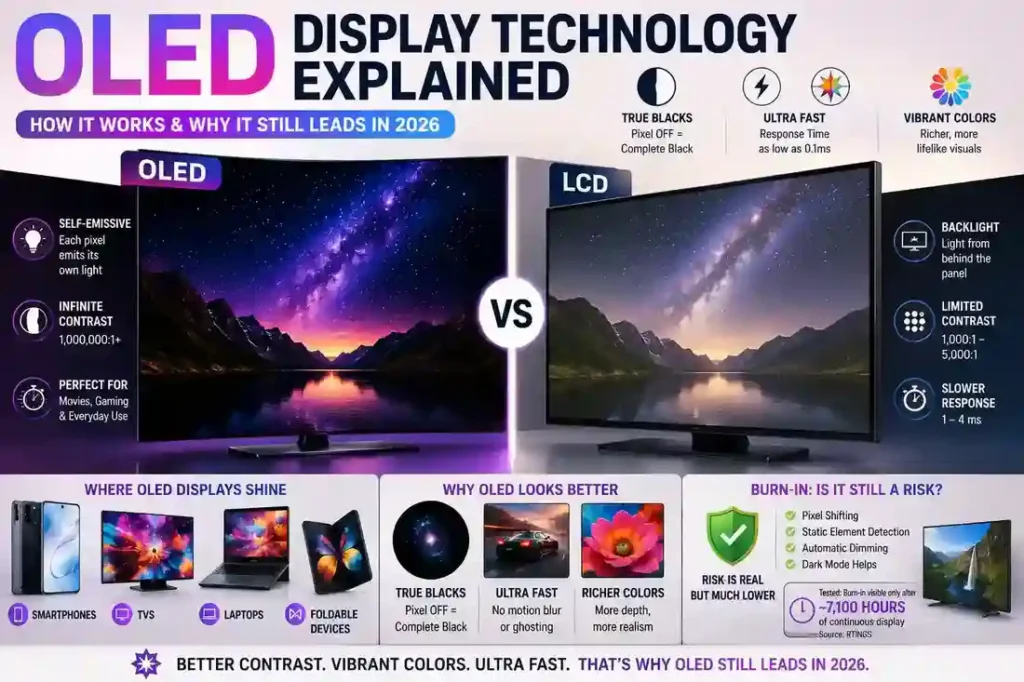
OLED, short for organic light emitting diode, throws that entire approach out. Each individual pixel is made of an organic compound that produces its own light when current passes through it, and there is no separate backlight layer at all.
This self emissive design is the reason an OLED display can turn a pixel completely off, dropping it to true black with zero light output.
Contrast ratio measures the gap between the brightest white and darkest black a screen can produce, and where a strong LCD panel tops out around 1,000:1 to 5,000:1, OLED panels routinely claim ratios above 1,000,000:1, according to lab testing published by DisplayMate Technologies.
In practical terms, that means starfields, night scenes and dark movie frames on an OLED screen show genuine depth instead of a washed out gray haze.
Response time follows the same logic. Because there is no liquid crystal layer that has to physically twist into position, OLED pixels can change state in roughly 0.1 milliseconds, compared with 1 to 4 milliseconds on a typical fast LCD panel.
That speed advantage is why OLED screens show almost no motion blur or ghosting during fast scrolling, sports broadcasts or competitive gaming.
Where LCD Still Has an Edge
None of this makes LCD obsolete.
Sustained full screen brightness is one area where a traditional LCD panel can still win, since OLED pixels generate heat when driven at high brightness and manufacturers deliberately cap full screen brightness to protect the organic material from degrading too quickly.
That is a genuine trade-off, not a marketing myth, and it is part of why some laptops built for outdoor or high brightness office use still ship with LCD rather than OLED panels.
| Feature | OLED | LCD |
|---|---|---|
| How pixels work | Each pixel produces its own light | Pixels control light from a separate backlight |
| Black levels | True black because pixels can turn completely off | Dark gray because the backlight remains active |
| Contrast | Extremely high; panels can exceed 1,000,000:1 | Typically around 1,000:1–5,000:1 |
| Response time | Around 0.1 ms | Around 1–4 ms |
| Motion handling | Excellent for gaming, scrolling and video | Good, but generally slower |
| Color | Rich, high-contrast and vibrant | Can be excellent, depending on panel |
| Full-screen brightness | Can be limited to manage heat and panel wear | Often stronger for sustained full-screen brightness |
| Burn-in risk | Possible with prolonged static content | No OLED-style burn-in |
| Typical uses | Premium phones, TVs, laptops, foldables | TVs, monitors, laptops and budget devices |
The Burn-In Question, Answered Honestly
Burn-in is the one word that follows every OLED display into a buying decision, and the honest answer in 2026 is that the risk is real but far smaller than it used to be.
Burn-in happens when the exact same bright element, a taskbar, a channel logo, a game’s health bar, sits in the same spot on the screen for thousands of hours. The organic material under that specific area wears down faster than the pixels around it, leaving a faint ghost image behind.
A long term test run by RTINGS found that persistent subtitles caused visible burn-in only after roughly 7,100 hours of continuous display, which for most people translates to years of regular use rather than months.
Modern OLED panels also ship with active countermeasures.
Pixel shifting nudges the entire image by a few pixels at set intervals so no single photosite bears the load indefinitely, and static element detection automatically dims or hides content, such as a taskbar or a paused video, that has stayed in one place too long.
Combined with simple habits like enabling dark mode and letting the screen sleep when idle, these features have made burn-in a genuine but manageable risk rather than the dealbreaker it once was.
| Factor | What It Means |
|---|---|
| What causes burn-in? | Static bright elements remaining in the same position for very long periods |
| Common examples | Taskbars, channel logos, game HUDs and other fixed interface elements |
| Is it still possible in 2026? | Yes, but modern OLED panels have significantly better protection |
| Pixel shifting | Moves the image slightly to distribute pixel wear |
| Static-element detection | Detects fixed content and can reduce its brightness |
| Dark mode | Reduces the amount of light emitted by many interface elements |
| Long-term testing | RTINGS reported visible burn-in after roughly 7,100 hours in a continuous-display test |
| Bottom line | A real risk, but generally manageable for typical mixed everyday use |
Where an OLED Display Shows Up Today
OLED has moved well past flagship phones.
It is now standard on premium TVs, common on midrange and flagship smartphones, and increasingly available on laptops aimed at creative work, where accurate color and true blacks matter for photo and video editing.
The technology’s ability to flex has also opened the door to foldable phones and curved TVs, since organic panels do not need the rigid backlight structure that limits how far an LCD screen can bend.
Bottom Line
An OLED display earns its premium price through physics, not marketing. Self emissive pixels deliver true blacks, extremely high contrast and near instant response time that LCD simply cannot match, and modern burn-in protections have made the technology far more forgiving over sustained use than it was in its earlier years.
Anyone choosing between an OLED and LCD panel who can live with slightly lower sustained brightness will generally get the stronger everyday experience from OLED.
Sources
– DisplayMate Technologies, display lab testing
– RTINGS, long term OLED burn-in testing
– Engadget, OLED burn-in explainer
– XDA Developers, OLED burn-in mitigation coverage, 2026